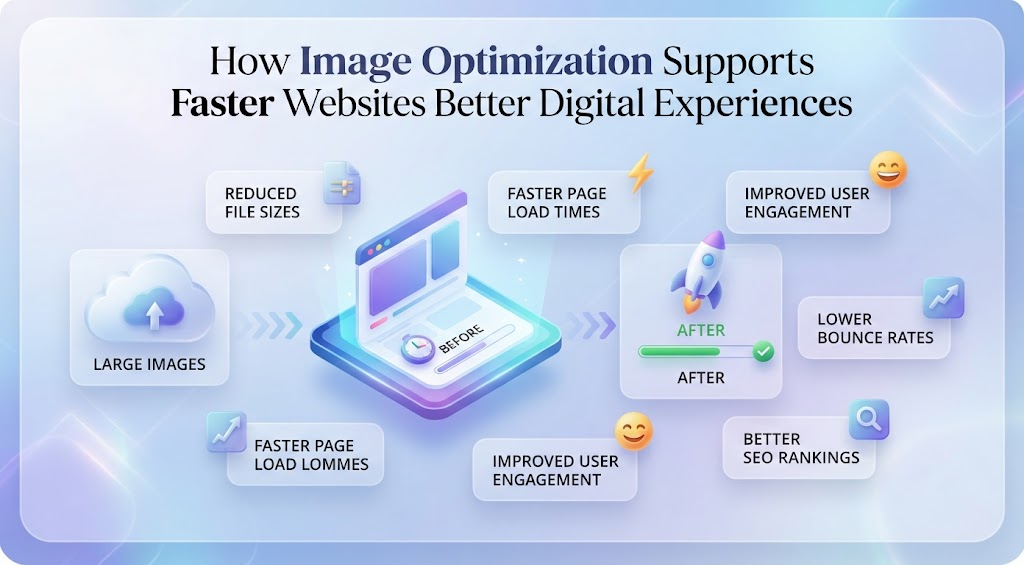
Images are essential for creating attractive, informative, and engaging websites. They help explain products, strengthen branding, support storytelling, and make online content easier to understand. At the same time, images can become one of the biggest causes of slow page performance when they are uploaded at unnecessarily large sizes or saved in inefficient formats. Image optimization helps solve this problem by reducing file weight while keeping visual quality at an acceptable level.
A good optimization strategy looks at more than compression alone. Image dimensions, file format, resolution, loading behavior, accessibility, and device type all influence how quickly a visual appears and how clearly it is displayed. A website that handles images well can feel noticeably faster, especially on mobile devices or slower connections. Better performance also makes the overall digital experience smoother and more reliable.
Format flexibility is especially useful because one image type may work well for a website but be less convenient for editing or sharing elsewhere. WebP is often a strong choice for online performance, while JPG remains broadly compatible with many tools and platforms. When a more traditional format is needed, a WebP to JPG tool can make it easier to prepare an image for different digital workflows.
Why Image Optimization Matters
Images can account for a large portion of the total size of a webpage.
That means even small improvements can make a meaningful difference.
Optimization can include:
Resizing images.
Compressing files.
Choosing efficient formats.
Using responsive images.
Enabling lazy loading.
Removing unnecessary metadata.
Each step reduces waste.
The result is a page that loads faster without losing the visual quality users expect.
Large Images Slow Pages Down
One of the most common problems is uploading an image that is much larger than the website needs.
A photo may be 5,000 pixels wide even though it is displayed at only 1,200 pixels.
The browser still has to download the larger file.
That extra resolution adds data without improving the visible result.
The same problem becomes more serious when several oversized images appear on the same page.
Resizing before uploading is one of the easiest ways to improve performance.
Compression Reduces Unnecessary File Weight
Compression reduces the amount of data stored in an image.
There are two main types.
Lossy compression removes some information to create smaller files.
Lossless compression reduces size while preserving all image information more carefully.
Photographs often tolerate moderate lossy compression very well.
Graphics containing text or sharp edges may need a more careful approach.
The goal is not maximum compression.
The goal is to make the file efficient while keeping it visually strong.
Choose the Right Format
Different formats are designed for different purposes.
JPG is a popular choice for photographs.
PNG is useful for transparency and sharp graphics.
WebP offers efficient compression for the web.
AVIF can provide even smaller files in some cases.
The right format depends on what the image contains and how it will be used.
A transparent logo has different needs from a product photograph.
A screenshot has different needs from a decorative background image.
Matching format to purpose helps avoid unnecessary file size.
Mobile Users Benefit the Most
Image optimization is especially important for mobile users.
Phones usually display images at smaller dimensions than desktop monitors.
They may also connect through slower or less reliable networks.
Serving a huge desktop-sized image to a phone wastes bandwidth.
Responsive image techniques can solve this.
They allow the website to deliver a smaller image to mobile devices and a larger version to bigger screens.
This improves loading speed without reducing quality where it matters.
Responsive Images Improve Efficiency
Responsive images adapt to screen size and device needs.
Instead of using one file for every visitor, the website can provide several versions.
The browser selects the most appropriate one.
This reduces unnecessary downloads.
It also improves visual sharpness.
A small screen gets a lightweight file.
A large display receives a higher-resolution image.
This approach is especially useful for ecommerce, publishing, and image-heavy websites.
Lazy Loading Speeds Up Initial Pages
Lazy loading delays images that are not immediately visible.
For example, a long article may contain fifteen images.
Only the first two or three appear on screen when the page opens.
There is no need to load the rest immediately.
Lazy loading waits until the user scrolls closer to those images.
This allows the browser to focus on visible content first.
The initial page becomes usable sooner.
Website Speed Affects User Experience
Performance is not only a technical issue.
It directly affects how people experience a website.
Slow-loading visuals create frustration.
Users may see blank sections.
Pages may shift as images finally appear.
Product galleries may feel unresponsive.
Fast image delivery makes a site feel more polished.
Users can move through pages more easily.
Information becomes available without unnecessary delay.
That creates a better overall impression.
Product Images Need a Careful Balance
Ecommerce websites depend heavily on photography.
Customers need to see detail before making a purchase.
Strong compression may hide textures, colors, or small features.
Very large images, however, can make the page slow.
A useful strategy is to serve optimized previews and allow higher-resolution versions when someone zooms.
This creates a balance between performance and detail.
The user gets a fast page without losing access to important visual information.
Hero Images Deserve Special Attention
Hero images are often large and highly visible.
Because they appear near the top of the page, they can strongly affect perceived loading speed.
If the hero image is heavy, users may feel that the entire website is slow.
Optimizing this image should be a priority.
It should be sized correctly.
Compressed carefully.
Delivered in an efficient format.
A visually strong hero image can still be lightweight when prepared properly.
Screenshots Need Sharp Details
Screenshots are different from photographs.
They often contain:
Text.
Buttons.
Menus.
Icons.
Interface elements.
Aggressive compression can make these details blurry.
This can make a tutorial or guide difficult to follow.
Screenshots usually benefit from formats and settings that preserve sharp edges.
PNG or carefully optimized WebP can often work well.
The right choice depends on the content.
Avoid Repeated Compression
Repeatedly saving a lossy image can reduce quality over time.
Each save may remove more information.
Eventually, the image can become noticeably degraded.
A better workflow is to keep a high-quality original file.
Whenever a new version is needed, create it from that original.
This preserves more detail and makes future resizing or conversion easier.
It also prevents quality loss from accumulating.
Keep Source Files Organized
Good optimization depends on good file management.
High-quality source files should be stored separately from optimized web versions.
This gives teams flexibility.
The same image may later be needed for:
Social media.
Print.
Presentations.
Advertising.
A larger website layout.
Future campaigns.
Keeping the original makes it easier to create new versions without starting from a compressed file.
File Names Should Be Clear
Descriptive file names make asset libraries easier to manage.
A file named product-dashboard-preview.jpg is easier to recognize than IMG_6382.jpg.
Clear naming helps teams find the right asset quickly.
It also reduces confusion when several versions exist.
File names should be simple and descriptive.
There is no need to make them unnecessarily long.
Consistency is more important than complexity.
Metadata Can Be Removed
Image files often contain hidden metadata.
This may include:
Camera settings.
Creation date.
Editing software.
Location information.
Copyright data.
Some of this may be useful.
Other information may be unnecessary for the website.
Removing unneeded metadata can slightly reduce file size.
It can also reduce the chance of accidentally publishing information that should remain private.
Many image optimization tools handle this automatically.
Alt Text Supports Accessibility
Optimization should also include accessibility.
Alt text describes meaningful images for people using screen readers.
This is important for:
Product images.
Charts.
Diagrams.
Instructional graphics.
Alt text should explain what is useful about the image.
It should not simply repeat the file name.
A fast-loading image is only valuable if users can understand its role.
Accessibility should be part of the publishing workflow from the beginning.
Image Optimization Can Support SEO
Efficient images can contribute to better technical performance.
Smaller files help reduce page weight.
Responsive images improve mobile usability.
Alt text can provide search engines with useful context.
However, image optimization is only one part of SEO.
Useful content, site structure, relevance, technical health, and user experience all matter.
Images support search performance best when they improve the page as a whole.
Content Delivery Networks Can Help
A content delivery network, or CDN, can improve image delivery by storing files across multiple locations.
When a visitor opens the website, the image can be served from a server closer to them.
This may reduce loading time.
Some image CDNs can also:
Resize files automatically.
Compress images.
Create WebP versions.
Deliver responsive sizes.
This reduces manual work.
However, important visuals should still be reviewed to make sure automated processing has not reduced quality too much.
Automation Saves Time
Large websites often contain hundreds or thousands of images.
Manually optimizing every file can become difficult.
Modern platforms can automate much of the process.
They may:
Resize uploads.
Compress images.
Create responsive versions.
Generate WebP files.
Enable lazy loading.
This makes optimization more consistent.
Automation is especially helpful when many people upload content.
Still, human review remains useful for important visuals.
Different Pages Need Different Priorities
Not every page has the same image requirements.
A portfolio may prioritize visual quality.
An ecommerce site needs detailed product photography.
A blog may focus more heavily on loading speed.
A technical documentation site may prioritize screenshot clarity.
Optimization should reflect the purpose of the page.
Using the same settings everywhere can produce poor results.
A flexible approach is usually better.
Social Media May Need Separate Versions
Website images are often reused on social platforms.
However, each platform may have different dimensions, cropping behavior, or compression.
This means one version may not work perfectly everywhere.
Keeping high-quality source files makes adaptation easier.
Teams can export different versions for:
Instagram.
LinkedIn.
Facebook.
X.
Email campaigns.
Presentations.
This creates better visual consistency across channels.
Avoid Duplicate Files
Duplicate files create confusion.
Teams may end up with several versions such as:
banner-final.jpg
banner-final2.jpg
banner-final-new.jpg
banner-final-approved.jpg
This makes it difficult to know which one should be used.
A better workflow keeps clear source files and approved exports.
Older versions can be archived if necessary.
Reducing duplicates improves organization and reduces mistakes.
Regular Audits Keep Performance Healthy
Image optimization should not be a one-time task.
Websites grow over time.
New images are added.
Older files may no longer meet current standards.
Periodic audits can identify:
Oversized images.
Outdated formats.
Poor compression.
Missing alt text.
Unused files.
Duplicate assets.
Fixing these issues can improve older pages without changing their content.
Regular maintenance prevents performance from gradually getting worse.
Test on Different Devices
An optimized image can look different depending on the screen.
Compression artifacts may be difficult to notice on a phone but obvious on a large monitor.
Small text may look fine on desktop but become unreadable on mobile.
Testing helps reveal these issues.
Important images should be reviewed on:
Phones.
Tablets.
Laptops.
Large monitors.
Different connection speeds.
Real-world testing provides better insight than looking only at file size.
Keep the Workflow Simple
A good image optimization process does not need to be complicated.
A practical workflow can be:
Choose the right format.
Resize the image.
Compress it appropriately.
Use a clear file name.
Add alt text.
Upload the optimized version.
Keep the original source file.
Review the result on different devices.
Simple processes are easier to follow consistently.
Consistency matters more than having a complicated system.
Better Image Optimization Saves Time
Optimization also improves team efficiency.
Designers can create approved exports.
Editors can find the right files quickly.
Developers receive correctly sized assets.
Marketing teams can reuse source visuals across channels.
Content managers spend less time fixing oversized images after publication.
These small improvements add up.
Image optimization becomes part of a stronger overall content workflow.
Conclusion
Image optimization supports faster websites and better digital experiences by reducing unnecessary file size while preserving the visual quality users need. Resizing, compression, efficient formats, responsive delivery, and lazy loading can all make pages feel faster and more reliable.
Good optimization also supports accessibility, mobile usability, consistent branding, and easier asset management.
The goal is not simply to make every image smaller. It is to deliver the right image, at the right size, in the right format, for the right situation.
When image optimization is handled thoughtfully, websites become faster, cleaner, easier to manage, and more enjoyable to use across devices and connection speeds.